What this blog covers
A headless CMS stores content as structured data and delivers it through APIs to any front end. Contentful offers a managed content platform, Strapi describes itself as the leading open-source headless CMS under an MIT licence, Sanity stores content in its Content Lake and queries it with GROQ, and Storyblok provides content delivery, management, GraphQL and image APIs and is known for visual editing. The right choice depends on content model complexity, editor needs, hosting preference, team skills, SEO requirements and cost model, so test two finalists with a proof of concept built on your real content.
Quick Answer: Define your content model, editor workflows, languages, integrations and rendering approach first. Shortlist two or three options and test them with real content and real editors in a time-boxed proof of concept. Weigh editing and preview experience, API fit for your front end, hosting and ownership preferences, SEO controls such as URLs, redirects and metadata, localisation, permissions, performance and total cost over three years. Verify current features and pricing directly with each vendor, since both change often.
Table of Contents
- What Headless Changes and What It Leaves Alone
- The Four Options in Brief
- Criterion One: Content Modelling
- Criterion Two: Editor Experience and Preview
- Criterion Three: SEO and Rendering Control
- Criterion Four: Hosting, Ownership and Cost
- Structured Content for Search and AI
- The Headless CMS Decision Framework
- Client Proof From Our Work
- Key Takeaways
- CXO Takeaway
What Headless Changes and What It Leaves Alone
A traditional CMS joins content, templates and delivery in one system. A headless CMS keeps content and its management and hands delivery to your front end through an API. That split lets you build with a modern framework, serve websites, apps and kiosks from one source and scale each part on its own terms.
It also moves responsibilities. Preview, routing, redirects, sitemaps and page rendering become your team’s job, or the job of a front-end framework. Our overview of headless commerce for enterprises explains the trade-offs, and the comparison of WordPress and custom PHP is a useful reference point for teams moving off a monolith.
Be honest about whether headless is right. Small sites with a single editor and a standard theme often do better on a traditional CMS or a managed platform. Headless earns its cost when many channels, many teams or demanding front-end performance justify it.
The Four Options in Brief
These summaries describe orientation rather than a ranking, and each vendor’s own documentation holds the current facts.
Contentful presents itself as a content platform with its own help centre, docs, APIs and changelog, and sells a managed, hosted service. It suits teams that want a mature SaaS model with governance features and a large ecosystem.
Strapi describes itself on its site as the leading open-source headless CMS, released under the MIT licence. Teams can self-host and customise it, which appeals to developer-led organisations that want ownership and control.
Sanity stores content in what its docs call the Content Lake, a real-time database for structured content, and queries it with GROQ. It suits teams that want a highly customisable editing studio and flexible structured content.
Storyblok offers content delivery, management, GraphQL and image service APIs, according to its API reference, and is known for visual editing that lets editors work on the page itself. Confirm the current visual editor capabilities in a trial, since the docs index leaves them undescribed.
Criterion One: Content Modelling
Model your content before you pick a tool. List the content types you need: pages, products, articles, authors, categories, FAQs, banners, store locations. Define fields, relationships, validation rules and reuse.
Test each candidate with your hardest case. A product page that combines commerce data, editorial blocks, reusable components and localised copy exposes weaknesses quickly. Check how the system handles references between entries, how it versions content, how it migrates schema changes safely and how it supports reusable blocks.
Good models separate content from presentation. A field called “Hero headline” works across web and app, while a field called “Large red banner text” ties content to one design.
Criterion Two: Editor Experience and Preview
Developers choose the CMS and editors live in it, so involve editors early. Let two or three of them complete real tasks in each candidate: create a page, edit a product story, schedule a campaign, translate a block and publish a correction.
Preview matters more than most teams expect. Editors want to see the page as customers will, before it goes live. Visual editing helps non-technical editors, and structured, form-based editing suits teams that value consistency. Check workflow features such as roles, approvals, scheduled publishing, audit trails and comments.
Measure the time to complete tasks. A slow, confusing editor experience leads to workarounds, delays and abandoned systems.
Criterion Three: SEO and Rendering Control
A headless CMS gives search results exactly what your front end builds. Decide the rendering approach first: server-side rendering, static generation or client-side rendering. Our guide on server-side versus client-side rendering explains how that choice affects crawlers.
Check how each CMS supports the SEO basics: editable titles and meta descriptions, canonical URLs, clean URL slugs, redirect management, hreflang for languages, sitemap generation, Open Graph tags and structured data fields. Where the CMS lacks a feature, confirm the front end can supply it.
Plan redirects and URL changes. Content teams move and rename pages, and without a redirect process, rankings leak. Decide where redirects live and who owns them.
Criterion Four: Hosting, Ownership and Cost
Hosting model shapes cost, control and effort. A managed SaaS service removes infrastructure work and charges for usage, seats or content volume. A self-hosted open-source tool gives ownership and flexibility and adds responsibility for hosting, security updates, backups and scaling. Some vendors offer both a self-hosted edition and a managed cloud.
Build a three-year cost model. Include licence or subscription fees, usage limits and overage rules, hosting, developer time, editor training, migration and support. Ask each vendor how pricing changes with more users, locales, content types and API calls, and read the current terms carefully.
Consider lock-in and exit. Check that you can export content in a usable format, and how easily your content model can move to another system.
Structured Content for Search and AI
Structured content has a built-in advantage for machines. When a CMS stores facts as fields, such as price, specifications, author, date, FAQs and ratings, your front end can output them consistently in the page and in structured data. Our guide on structured data for SEO covers markup, and the piece on entity-based SEO explains why consistent entities matter.
AI assistants and search engines extract facts and answers from pages. Clean headings, short answers, tables and matching markup, all produced from structured fields, help them do it. Our GEO playbook shows how, and Google’s page on AI features in Search says standard SEO fundamentals apply to AI Overviews and AI Mode, so crawlable, well-structured pages remain the base.
The Headless CMS Decision Framework
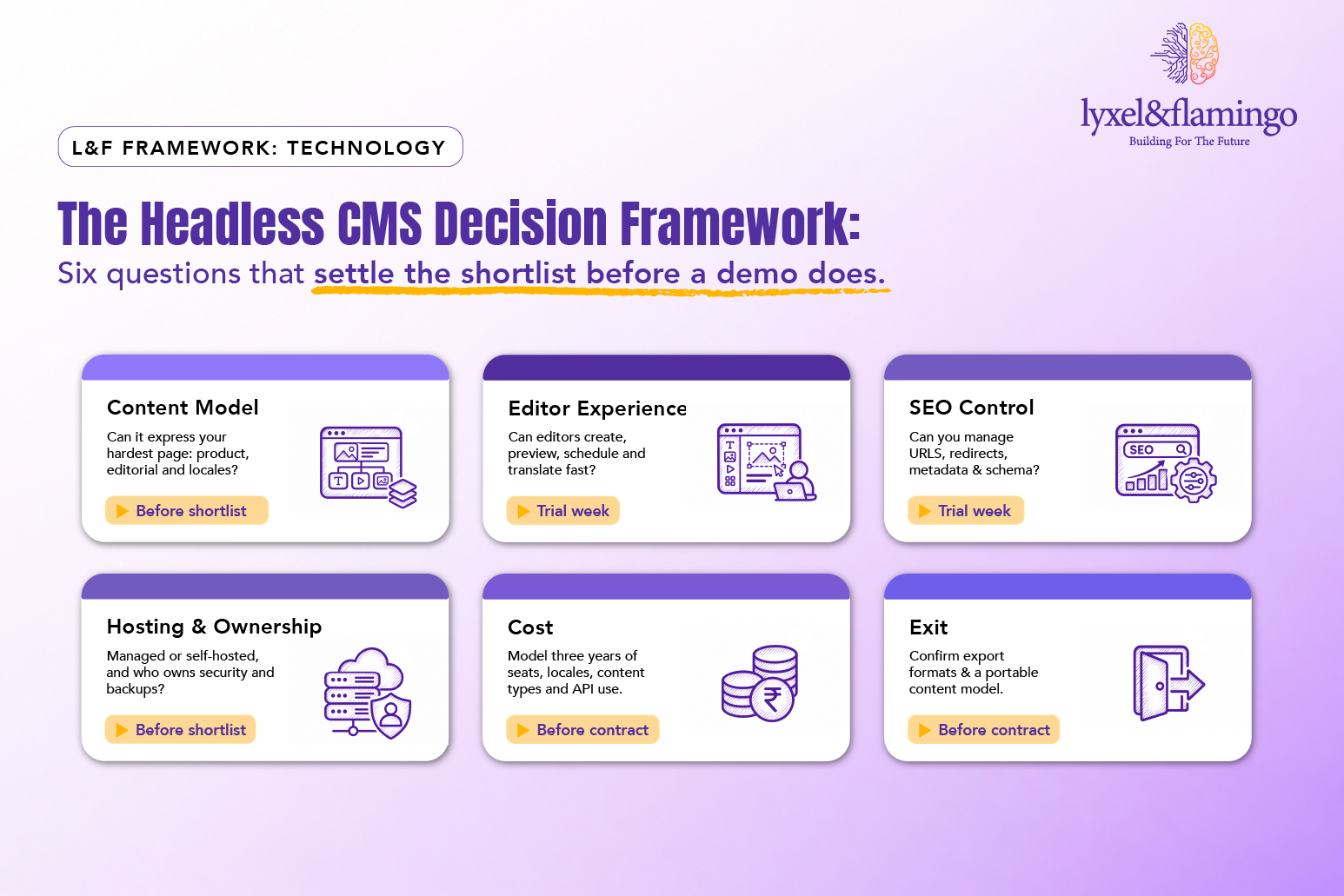
Framework Explained
Score each shortlisted CMS against all six questions before you watch a demo. A product that fails one question badly can still win if the others matter more, and the scorecard shows that trade-off openly.
Step 1: Content Model. Build your hardest real page, such as a product page with editorial blocks in two languages, as a test model. Check: the CMS expresses it without workarounds.
Step 2: Editor Experience. Give editors five real tasks: create, preview, schedule, translate and correct a published page. Time them. Check: editors finish without developer help.
Step 3: SEO Control. Confirm you can manage URLs, redirects, metadata, canonical tags, hreflang and structured data, and check how the rendering mode affects crawling. Check: an SEO lead signs off on the trial.
Step 4: Hosting and Ownership. Decide between a managed service and self-hosting, and list who handles security, backups and scaling. Check: every duty has a named owner.
Step 5: Cost. Model three years of cost: seats, locales, content types, API calls and environments. Ask each vendor for the pricing triggers. Check: the cost model survives a doubling of content.
Step 6: Exit. Confirm you can export content in an open format and that your content model stays portable. Check: a trial export imports cleanly into a test system.
CAPABILITY NOTE: Lyxel&Flamingo’s technology team designs and builds headless and decoupled storefronts and content platforms, and helps teams run proof-of-concept comparisons. This guide describes each vendor from its own public documentation, points to related client engagements in the proof section and recommends verifying current features and pricing with the vendors.
Client Proof From Our Work
A headless choice shows up in how a site is built, rendered and migrated. These two builds describe decoupled architecture and SEO-safe migration.
Pizza Pizza describes a decoupled front end and API, which is the architecture a headless CMS plugs into. Kenstar describes a platform migration with full URL mapping. Neither page names a headless CMS product.
Key Takeaways
- Model your content and workflows before choosing a tool.
- Contentful, Strapi, Sanity and Storyblok differ in hosting model, editing style and ownership, so match them to your team.
- Test editors and developers on real tasks in a short proof of concept.
- Confirm how URLs, redirects, metadata and structured data will be handled.
- Structured content helps search engines and AI assistants extract accurate facts.
CXO Takeaway
If your three most active editors had to publish a campaign page tomorrow, which CMS would let them do it without a developer? The answer to that question usually narrows the shortlist faster than any feature matrix. Lyxel&Flamingo’s technology team can run the comparison with your content.
Frequently Asked Questions
A content management system that stores content as structured data and delivers it through APIs to any front end, such as a website or app.
Strapi describes itself as open source under the MIT licence, and managed and enterprise options exist, so check its current pricing and terms.
Compare content modelling, editor experience, SEO control, hosting and cost, then test two finalists with real content and real editors.
It can, when the front end renders pages for crawlers and manages URLs, redirects and metadata well, and structured fields make it easier to produce consistent markup.