What This Blog Covers
A Shopify store with dozens of apps rarely got there by decision; it got there one fix at a time, each reasonable on the day it was installed. This article explains what app tech debt looks like in speed, security and reporting, why uninstalling an app does not always remove its code, and how apps overlap with features Shopify already provides. It gives founders, CMOs and operations leads a four-step audit that inventories every app, makes each one justify its revenue, retires what fails and sets governance so the debt does not return, with a scorecard your team can run in a single week.
Quick Answer: A Shopify app stack audit inventories every installed app, assigns an owner and a metric to each, tests its effect on speed and revenue, and retires the apps that fail. Shopify’s own criteria for Built for Shopify apps show what good looks like: theme app extensions that uninstall cleanly and no more than a ten-point drop in the Lighthouse performance score. Run the audit quarterly, so a store with 40 apps becomes a store where every app has a reason.
Table of Contents
- What tech debt looks like inside a Shopify store
- The hidden code that outlives every app you uninstall
- Why every app needs an owner, a metric and a renewal date
- The performance bill that arrives in page speed and conversion
- How to run a Shopify app stack audit: the App Debt Audit
- The framework explained
- What to do after the audit so the debt stays gone
- Key takeaways
- The CXO takeaway
The most expensive Shopify app is the one your team struggles to explain. It loads on every page, touches customer data and bills you every month.
Quick answer: A Shopify app stack audit inventories every installed app, assigns each an owner and a metric, tests its effect on speed and revenue, and retires the apps that fail. Shopify’s own Built for Shopify requirements show what good looks like: theme app extensions that uninstall cleanly and a cap on how far an app can pull down a store’s Lighthouse performance score. Run the audit quarterly, and a store with 40 apps becomes a store where every app earns its place.
What tech debt looks like inside a Shopify store
App debt is the pile-up of tools added in a hurry and kept by habit. Each one began as a smart answer to a real problem: a review widget, a pop-up, a bundle tool, a loyalty programme, a reporting plug-in. Two or three years later, the store carries overlapping tools, abandoned trials and scripts from vendors long forgotten. The cost arrives slowly. That is exactly why ownership drifts.
Published averages on app counts disagree wildly, so skip the benchmark debate. The count matters less than the reason. A store with eight justified apps beats a store with three unexplained ones.
Growing brands feel it first, because they add tools fastest. As we covered in why global brands move to Shopify Plus for scale, security and automation, automation can replace patchwork apps. A platform upgrade raises the stakes of discipline, and discipline stays essential.
Start with one question to your team: which of our apps would we miss within a week? The apps your team would barely miss are your first candidates. Expect a longer list than anyone predicts.
The hidden code that outlives every app you uninstall
Uninstalling an app can leave behind what it added. Shopify’s Help Center notes that some apps add theme code that stays behind after removal, which is why long-running stores carry remnants of retired integrations. Orphaned snippets keep loading scripts, styles and tracking calls. The app is gone. The cost stays.
Leftover code is a speed problem and a security problem. A script from a former vendor can still call a remote server, and every principle in website security as a brand asset applies to that call. Review theme files after every uninstall, remove the orphans and back up the theme before you edit anything.
Shopify has already set the better standard. Built for Shopify storefront apps must use theme app extensions, which plug into themes cleanly, with zero injected code and remove their blocks automatically on uninstall. When you choose or replace an app, favour vendors who meet that bar. Clean uninstalls today mean less debt tomorrow.
Keep a five-line uninstall checklist: remove the app, search theme files for its name and scripts, check tracking and checkout settings, re-test page speed, log the result against a named owner. Small habit. Large saving.
Why every app needs an owner, a metric and a renewal date
Ownership cures most app debt. Every app deserves a named business owner, a technical contact, a metric it should move and a renewal date. Tracking apps need extra care, since duplicate pixels distort the data that your Meta Pixel and Conversions API setup relies on for media decisions. Ownerless apps mean endless invoices.
Make the metric specific. A review app should lift conversion on pages where reviews appear. A loyalty app should lift repeat purchase. A bundling app should lift margin per order. When the owner can name the metric, the app is a tool. Until then, it is a hope. Ask for the evidence at renewal, every time.
The app audit scorecard: five questions for every app
- Does it earn revenue?
Evidence to collect: Attributed revenue or a controlled test against a baseline
Decision rule: Keep when measured lift exceeds the full annual cost; otherwise retire - Does it duplicate something?
Evidence to collect: Overlap with another app or a native Shopify feature
Decision rule: Consolidate to one tool and remove the rest - What does it cost in speed?
Evidence to collect: Page speed and script weight on key templates, with the app switched on and off
Decision rule: Replace or remove when the cost hits pages that earn the sale - Who owns it?
Evidence to collect: A named business owner and technical contact
Decision rule: Assign an owner within a week or retire the app - What data does it touch?
Evidence to collect: Customer data accessed, vendor terms and consent handling
Decision rule: Review with legal and security; remove when the purpose is unclear
Overlap is the quiet leak. Two pop-up apps, three review apps, several analytics tools, each adding cost, script weight and mixed messages. Shopify also keeps shipping native features, so an essential app from three years ago may now duplicate the platform. Check the platform before you renew.
Tie every app to goals that matter. One goal, many funnels shows how clean tracking proves your UX is working, and the same logic proves whether an app earns its keep. Measure first. Then keep or cut.
The performance bill that arrives in page speed and conversion
Every storefront app carries a speed cost, and the costs compound. Shopify’s app performance guidance treats storefront impact as a core quality signal, and Built for Shopify caps how much any single app may reduce a store’s Lighthouse score. Ten apps can drag a store down while each app looks innocent on its own.
Measure the cost directly. Run speed tests on key templates with each suspect app switched on and off, on a staging copy of the theme. Compare load time, interaction delay and third-party script weight. Numbers end arguments.
Then connect speed to revenue. A UX friction audit shows where shoppers stall, and slow product and checkout pages are frequent culprits. The checkout tax spells out how latency quietly eats D2C revenue. When an app slows the pages that earn the sale, its benefit must clear that cost.
Present the result in rupees. Estimate revenue exposed on the slowest templates using your own conversion data, and set it beside the annual cost of the apps involved. A founder reads a rupee figure faster than a performance score.
How to run a Shopify app stack audit: the App Debt Audit
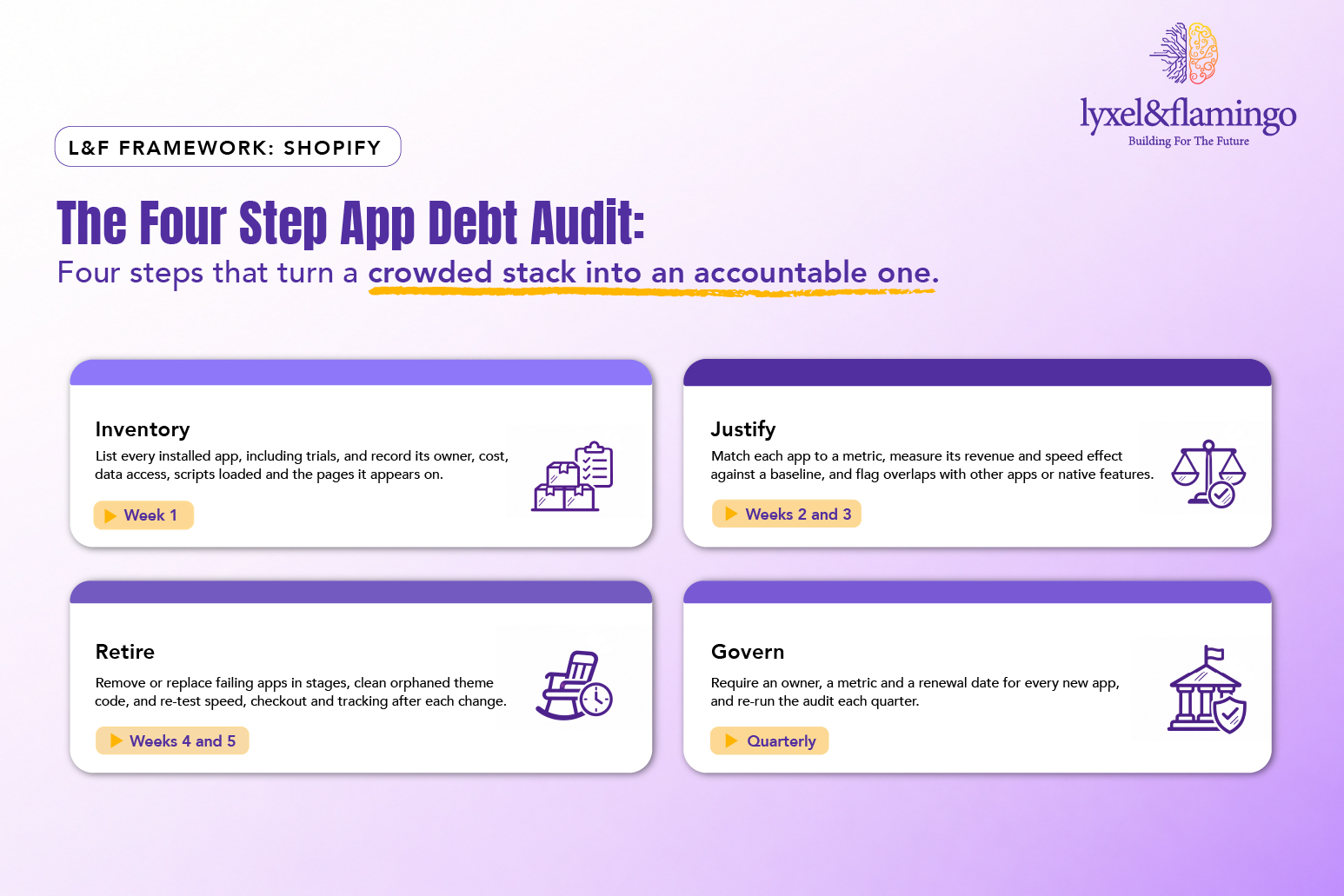
Four steps turn a crowded stack into an accountable one. The timings are a recommended plan for a mid-sized store.
The framework explained
Inventory: List every installed app, including trials and dormant ones. Record the owner, monthly and annual cost, data accessed, scripts loaded and pages where it appears. Check theme files for leftovers from past uninstalls. The inventory alone usually surfaces duplicates and forgotten subscriptions, which is why it comes first.
Justify: Make each app earn its seat. Tie it to a metric, measure the effect against a baseline and test page speed with it switched on and off. Compare it with native Shopify features and with rival apps. Keep an app only when its measured benefit beats its full cost.
Retire: Remove failing apps in stages, highest cost and lowest benefit first. After each removal, clean orphaned code and re-test speed, checkout and tracking. Keep a rollback plan and a change log, so you know exactly which change produced which result.
Govern: Stop the debt growing back. Require an owner, a metric, a data review and a renewal date for every new app, publish a one-page app policy and add it to onboarding. Governance costs less than clean-up, every single time.
What to do after the audit so the debt stays gone
A cleaner stack deserves protection. When the audit leads to theme or platform work, follow the discipline in our pre- and post-migration checklist for Shopify Plus: snapshot performance, rankings and revenue before the change and compare after. Measure before and after every cut.
Write a one-page app policy. Who may install apps, what evidence an app needs for approval, how trials work and when owners review renewals. A policy turns good intentions into habit.
Review every app that touches customer data against your privacy duties, including consent and breach response. Ask each vendor, in writing, where data is stored and how deletion works.
Some stores genuinely outgrow an app-based model. When complexity, speed or integration needs keep climbing, headless commerce for enterprises shows what a custom architecture buys and costs. Make that call after the audit. Clean the house before you rebuild it.
This is the kind of stack clean-up the Lyxel&Flamingo Shopify Plus team runs for D2C brands, from the O3+ Shopify migration to the Kenstar Shopify rebuild.
Key takeaways
- App debt builds one reasonable fix at a time. It arrives by accident, so ownership arrives late.
- Uninstalling can leave code behind. Audit theme files after every removal.
- Every app needs an owner, a metric and a renewal date.
- Test speed and revenue with each suspect app switched on and off, and report the result in rupees.
- Re-run the audit quarterly so the stack stays lean.
The CXO takeaway
Ask your ecommerce lead for a list of every installed app with its owner, monthly cost and the metric it moves. Anything missing one of the three goes onto a retire list. Ask developers to measure page speed on key templates with the five heaviest apps switched on and off, and bring back the answer in rupees of exposed revenue. Fund a one-week audit before your next peak season, when slow pages cost the most. Adopt a one-page app policy so every new app arrives with evidence.
One question to take into Monday: if you removed your five most expensive apps tomorrow, which would customers actually miss?
Ready to find out? Start the conversation with Lyxel&Flamingo and we will help you run the first audit.
Frequently Asked Questions
The right number depends on your business. Published averages disagree, and the right count depends on your business. The test is whether each app has an owner, a metric, a clear purpose and an acceptable speed cost. A store with many justified apps is healthier than one with a few unexplained apps.
They can. Some apps add theme code that stays behind after uninstall, so orphaned snippets keep loading scripts. Check theme files after every removal and re-test page speed. Prefer apps built with theme app extensions, which remove their blocks automatically.
Run speed tests on key templates, home, collection, product and cart, with the app switched on and off on a staging copy of your theme. Compare load time, interaction delay and third-party script weight. Repeat after each change and log results next to the app in your inventory.
Only once the audit proves the stack itself is the constraint. Custom code removes some app costs and adds others: development time, maintenance and people to look after it. Compare the three-year cost against cleaning and governing what you already have. Clean first, build second.