What this blog covers
Site search works when it understands how shoppers phrase things, returns relevant results quickly, offers useful filters and handles failures gracefully. A good audit starts with the search report: top queries, zero-result queries, queries followed by exits and the conversion rate of searchers. Fixes include synonyms, spelling tolerance, autocomplete, ranking rules, merchandising and mobile-first design. The Biotique project describes a discovery-first redesign with navigation rebuilt around how shoppers browse, and on-site queries feed keyword research and content planning.
Quick Answer: Pull your on-site search report and look at the top queries, the queries that return zero results, the queries that lead to exits and the share of revenue from sessions that use search. Fix the biggest failures first: add synonyms and spelling tolerance, show autocomplete suggestions, rank results by relevance with sales and stock signals, offer useful filters and design the search box and results for thumbs. Review the report monthly, feed gaps into your catalogue and content, and treat natural-language queries as a guide to how shoppers phrase questions to assistants.
Table of Contents
- Why Search Users Matter So Much
- Step One: Read the Search Report
- Step Two: Fix Matching
- Step Three: Improve Results and Filters
- Step Four: Design for Mobile
- What the Biotique Redesign Shows
- Search Queries as Keyword and Prompt Research
- The Site Search Framework
- Framework Explained
- Client Proof From Our Work
- Key Takeaways
- CXO Takeaway
Why Search Users Matter So Much
Visitors who use site search usually arrive with a goal. They are further along than browsers, so a good experience can convert at a higher rate and a bad one loses people who were ready to buy. Many stores see searchers contribute a share of revenue larger than their share of sessions, which makes search a place to look before buying more traffic.
Our guide on failure points on ecommerce sites that limit scaling lists weak discovery among the conversion leaks, and our piece on learning from rage clicks shows how session recordings reveal people fighting a search box.
Step One: Read the Search Report
Start with data. Enable site search tracking in analytics or use your search tool’s report. Our guide on setting up GA4 and the walkthrough on incorporating GA4 with GTM explain how to capture the search term as a parameter.
Look at five views. Top queries show what shoppers want most. Zero-result queries show what the catalogue or the matching fails to answer. Queries followed by an exit show where results disappoint. Queries with low click-through show where results look wrong. Revenue and conversion for sessions with search show the prize.
Group the queries into themes: product names, categories, attributes (“oily skin,” “size 9”), problems (“hair fall”), brands, misspellings and questions (“how to use”). Each theme calls for a different fix.
Step Two: Fix Matching
Most failures come from vocabulary gaps. Add a synonym list that maps shopper language to catalogue language: “kurta set” to “co-ord,” “sneakers” to “shoes,” “vit c” to “vitamin C.” Handle plurals, spelling mistakes and local variants, including transliterated words common in your market.
Add autocomplete that suggests popular queries, categories and products as people type. It speeds up the task, reduces typing on mobile and steers shoppers toward terms your catalogue understands.
Give zero-result pages a purpose. Instead of a dead end, show close matches, popular products, category links and a way to contact support. Record those queries and send them to merchandising, since a recurring zero-result term signals a catalogue or content gap.
Step Three: Improve Results and Filters
Ranking should balance relevance with business signals. Start with textual relevance, then adjust for popularity, availability, margin, ratings and recency. Push out-of-stock items down, and let merchandisers pin or boost products for campaigns.
Make filters useful. Show the attributes shoppers use to decide, such as skin type, size, price range, brand and rating, and hide filters that mean nothing for the current results. Show counts and let people clear filters quickly.
Treat result snippets as product pages in miniature: clear images, names, prices, ratings and key badges. Test the first row, since most clicks happen there. Our guide on how to increase AOV shows how guided discovery can lift order value.
Step Four: Design for Mobile
Most searches happen on phones. Place the search box where thumbs find it, keep it visible on scroll, support voice and camera input if your platform allows it and keep autocomplete fast. Make results load quickly, since Google’s Core Web Vitals guidance sets clear targets, such as a Largest Contentful Paint within 2.5 seconds at the 75th percentile.
Design filters for small screens: a slide-up panel with clear buttons and a visible “show results” control. Keep tap targets large. Test with real devices and slow connections.
What the Biotique Redesign Shows
Biotique is an Ayurveda-based skincare brand, and the Biotique website UI/UX case study, published in July 2026, describes five structural issues: a weak first impression, navigation that felt like a wall, slow performance, checkout drop-offs and a mobile experience that had been deprioritised.
The response started with an audit before design, rebuilt navigation around discovery, used interactive prototypes before development, treated performance and SEO as one problem, built a mobile-first experience and put SEO into the Shopify architecture, with Razorpay and Unicommerce in the stack. The case study says bounce rates fell and publishes zero figures, so this article treats it as a reference for the thinking, which is to fix how people find products before spending on more visitors, and quotes zero results. It covers navigation and architecture more broadly than the search box itself, and the same discovery-first logic applies to search.
Search Queries as Keyword and Prompt Research
On-site queries show demand in your customers’ own words, which makes them a free keyword source. Compare them with your organic landing pages: a frequent query without a matching page is a content or category opportunity. Our SEO and GEO tracking strategy explains how to combine query sources.
Natural-language queries deserve special attention. When shoppers type full sentences, such as “moisturiser for dry skin under 500,” they mirror how people prompt AI assistants. Pages that answer those questions clearly, with specifications, prices and short explanations, serve both. Our GEO playbook explains how to earn citations, and Google’s page on AI features in Search says standard SEO fundamentals apply.
Keep category pages and filtered landing pages crawlable where they match real searches, and use consistent product attributes everywhere, so the same facts appear in search results, on pages and in markup.
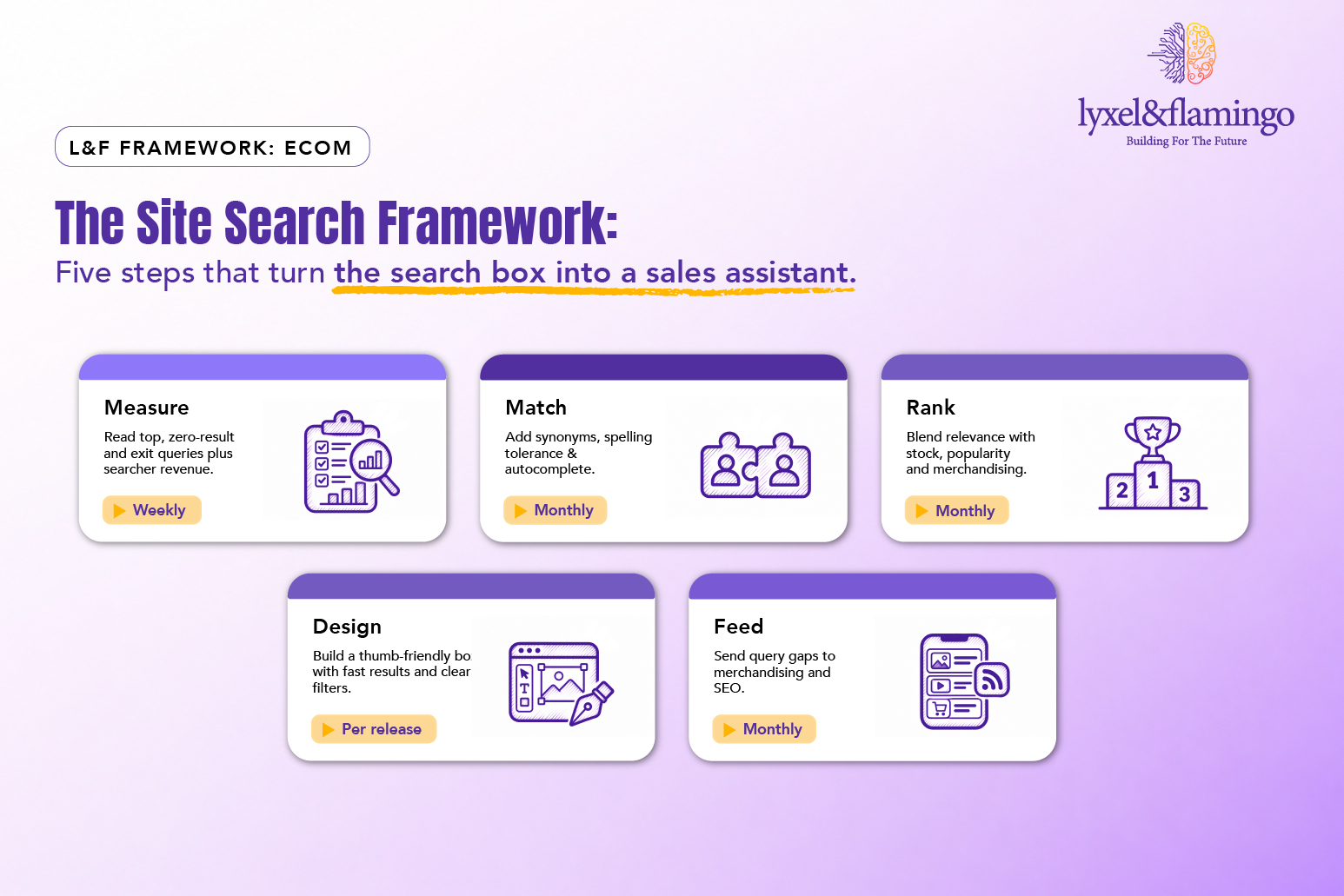
The Site Search Framework
Framework Explained
Follow the five steps as a monthly cycle. Measurement finds the failures, and the next four steps fix them in order of value.
Step 1: Measure. Pull the search report and list top queries, zero-result queries, queries followed by exits and revenue from sessions that use search. Check: the report exists and someone owns it.
Step 2: Match. Add synonyms that map shopper words to catalogue words, tolerate spelling errors and show autocomplete suggestions. Check: your top twenty zero-result queries now return results.
Step 3: Rank. Rank by relevance first, then adjust for popularity, stock, margin and merchandising. Show filters that matter for the current results. Check: out-of-stock items rarely appear in the first row.
Step 4: Design. Place the search box where thumbs reach, keep results fast and design filters for small screens. Check: you tested search on real phones and slow connections.
Step 5: Feed. Send recurring query gaps to merchandising and SEO so the catalogue and content close them. Check: each month, at least one gap becomes a new page, product or synonym.
CLIENT PROOF POINT: Lyxel&Flamingo rebuilt Biotique’s Shopify website with a discovery-first approach: an audit before design, navigation rebuilt around discovery, mobile-first design and SEO built into the architecture. The case study notes that bounce rates fell and publishes zero figures. Read the full Biotique case study.
Client Proof From Our Work
Discovery covers navigation, filters and search. These two builds describe discovery work in different categories.
Biotique publishes zero figures. Pizza Pizza’s page describes contextual menu filters and category structure, and its load-time result applies to the whole build.
Key Takeaways
- Searchers arrive with intent, so weak search wastes the best traffic.
- Start with the search report: top queries, zero results, exits and searcher revenue.
- Fix matching with synonyms, spelling tolerance and autocomplete.
- Rank by relevance plus business signals, and keep filters useful and mobile-friendly.
- On-site queries feed keyword research and mirror how shoppers prompt AI assistants.
CXO Takeaway
What are your top twenty zero-result search queries, and who owns fixing them? A single hour with the search report usually finds revenue. Lyxel&Flamingo’s ecommerce team runs discovery audits before recommending more media spend.
Frequently Asked Questions
Improving how a store's search box understands queries, ranks results and offers filters so that shoppers find products quickly.
Review your search report for top queries, zero-result queries, queries followed by exits and the conversion rate of sessions that use search.
Indirectly. On-site queries reveal keyword demand and content gaps, which guide categories, landing pages and content.
Shoppers increasingly type full-sentence queries similar to AI prompts, so pages that answer them clearly serve both.